The AI email assistant that sounds like you
Aeralis works inside Gmail and quietly picks up how you write — your greetings, your sign-offs, your level of formality. Every draft sounds like you, not a robot.

It writes like you because it learned from you
Most AI email tools sound like AI. Aeralis reads your actual emails first, then writes like you do.
Learns from your sent emails
Aeralis picks up your greetings, sign-offs, sentence length, even how formal you get — automatically, from threads you participate in. No settings to tweak.
Different voice per context
You probably write differently to clients than to your team. Create a profile for each context, each with its own learned style.
Reads the whole thread
It reads every message in the conversation before replying. Summarizes what happened and suggests what to say next.
Pulls from your sources
Point it at URLs, uploaded docs, or Google Maps locations. It references your actual data instead of making things up.
Live web search built in
Need current pricing, a stat, or a company detail? Aeralis searches the web and weaves it into the email.
Replies and new drafts
Reply, reply-all, or compose from scratch. Click Aeralis in the Gmail sidebar, tell it what you want to say, done.
Automate emails in the background
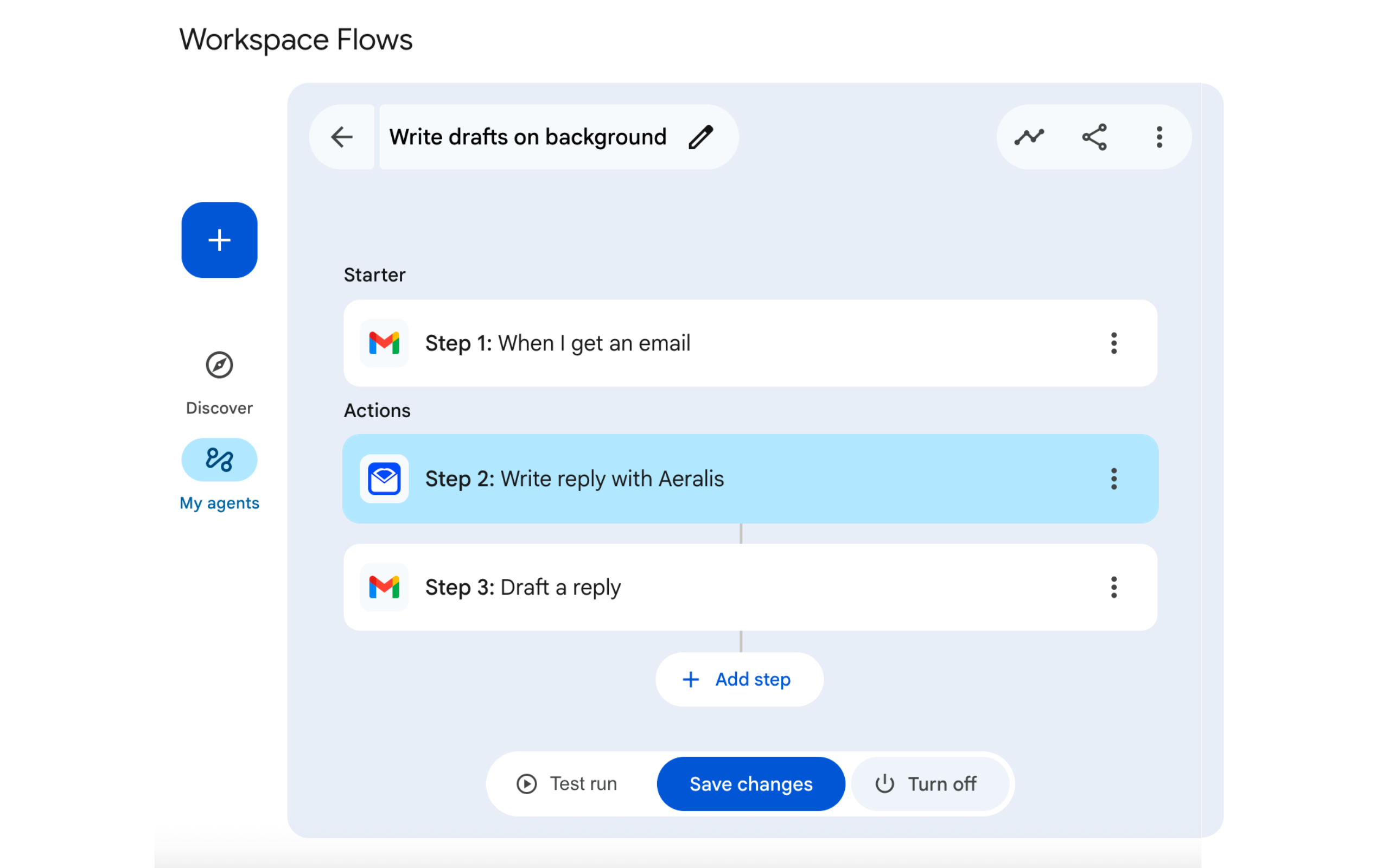
Connect Aeralis to Google Workspace Studio and it drafts replies when emails arrive, or writes new emails triggered by Calendar events, Forms, or schedules. Everything lands in your Drafts folder — nothing sends without you.
- Reply to incoming emails
Set up workflows that draft replies when specific emails arrive
- Compose from any trigger
Create emails from Calendar events, Forms, Sheets, or scheduled times
- Drafts ready to send
Review and send when you're ready — nothing is sent automatically
- Uses your profiles
Same writing style, context sources, and voice from your Aeralis profiles
Simple, transparent pricing
Free tier included. No credit card to start.
Free
—
Test Aeralis with zero friction
- 8 emails / month
- 1 profile
- Google Search grounding
- Google Maps grounding
- 20 context sources
Pro
$140 billed annually (save $28)
For professionals using Gmail daily
- Everything in Free
- Unlimited emails
- Unlimited profiles
- Knowledge (docs, PDFs)
- Priority email support
No credit card required for the Free tier. 30-day money-back guarantee on all paid plans.
Aeralis never reads your inbox. It only processes the thread you’re viewing, and only while Aeralis is open in the sidebar.
Compare plans
| Feature | Free | Pro |
|---|---|---|
| Emails per month | 8 | Unlimited |
| Profiles | 1 | Unlimited |
| External context sources | 20 | 20 |
| Thread context | ||
| Google Search grounding | ||
| Google Maps grounding | ||
| Knowledge (docs, PDFs, etc.) | — | |
| Writing Style samples | 5 | Unlimited |
| Support level | Email only | Priority |
| Price | $0/mo — | $14/mo $140/yr (save $28) |
Frequently asked questions
Everything you need to know about Aeralis
How does the free tier work?
8 emails per month, no credit card required. You get 1 profile with writing style learning (Aeralis picks up your voice automatically), thread awareness, and both reply and compose features.
Is my email content stored?
When you view a thread with Aeralis open, the messages you wrote in that thread are stored as style examples for your profile. The other party's content is never stored as an example. Threads you generate drafts for are processed in real-time and not retained. We keep anonymous usage counts for billing, nothing else.
What AI model powers Aeralis?
Google Gemini 3.1 Flash. It generates drafts in a few seconds. Google Search and Google Maps are used for grounding when you enable them on a profile.
Does it work with Google Workspace?
Yes. Aeralis works with both personal Gmail and Google Workspace accounts. For Workspace, your admin may need to approve the add-on depending on your organization's policies. Individual users can install it directly with no special setup.
Can I cancel anytime?
Yes. Cancel anytime from your dashboard. Access continues until the end of your billing period, and you can always downgrade to the Free tier with no loss of data or configuration.
Does Aeralis read my entire inbox?
No. Aeralis only reads the thread you’re currently viewing, and only while Aeralis is open in the sidebar. The rest of your inbox is never touched.
Do replies sound like me?
Yes. As you use Aeralis, it quietly picks up your greetings, sign-offs, sentence length, and formality from threads you participate in. The more you use it, the better the match. You can also write a one-line “How you write” hint in your profile to lock in tone faster.
Can I use Aeralis to write new emails, not just replies?
Yes. You can generate full drafts for new outgoing emails directly from the Gmail sidebar using any of your profiles.
Can I add my own documents, links, or files as context?
Yes. Every plan includes context URLs, Google Search, and Google Maps grounding. Pro adds Knowledge folders for documents, PDFs, and notes.
Does Aeralis work on mobile Gmail?
Yes. The Gmail add-on works on mobile apps for both iOS and Android with the same capabilities as desktop.
What permissions does Aeralis require?
Read the thread you're replying to and create a draft. That's it. Aeralis does not request full inbox access.
Free AI email tools
Try AI-powered email writing without signing up.
AI Email Writer
Write complete emails from a prompt
Subject Line Generator
Generate compelling subject lines
Reply Suggestions
Get reply suggestions for any email
Tone Converter
Convert email tone without rewriting
Cold Email Personalizer
Personalize cold outreach at scale
Signature Generator
Create professional email signatures
Solutions by industry
Aeralis adapts to how your industry writes.
From the blog
Practical guides for people who write a lot of email.
How it works
Three steps. No templates, no prompt engineering. Just your voice.
Install the add-on
Add Aeralis to Gmail. That's the entire setup — no forwarding, no training step.
Aeralis learns your style
As you read and reply to threads, Aeralis quietly picks up your greetings, sign-offs, sentence length, and formality. No generic “professional tone” setting — your actual voice.
Generate emails that sound like you
Open any email in Gmail, click Aeralis, done. Replies match the conversation. New drafts match your style. Nobody can tell the difference.
Stop writing emails from scratch
Install the add-on. Aeralis learns your voice as you use it. Every draft sounds like you wrote it.
Add to GmailFree to start